
Symptoms vs. Root Cause: Why Great Problem Solvers Look Beyond the Obvious
When a system stops working, an application becomes slow, users cannot access a service, or a security alert appears, the first thing people usually notice is the symptom.
The challenge is that a symptom is rarely the actual reason a problem exists.
Understanding the difference between symptoms and root causes is one of the most important skills in troubleshooting, systems administration, cybersecurity, engineering, and technical leadership.
A technician who focuses only on symptoms may restore service temporarily.
A strong problem solver asks a deeper question:
"Why did this happen in the first place?"
That question leads from symptom management to root-cause analysis.
What Is a Symptom?
A symptom is an observable indication that something is wrong.
It is what users, monitoring systems, administrators, or customers can see.
Examples include:
A website is unavailable.
An application is running slowly.
A server is using excessive CPU.
Users cannot log in.
A database query is timing out.
Network connectivity is intermittent.
A security alert is generated.
A disk is almost full.
A service repeatedly crashes.
Symptoms are important because they provide clues.
However, they do not necessarily explain why the problem occurred.
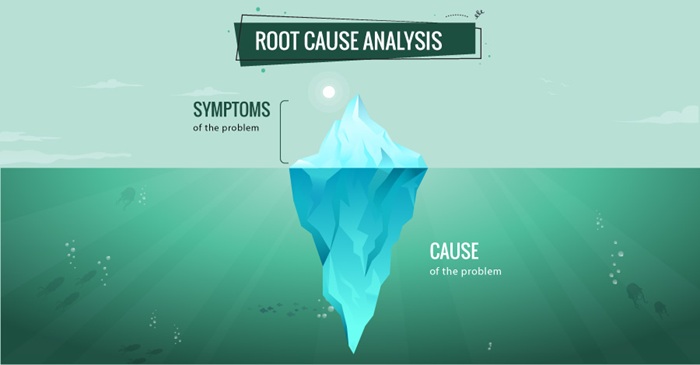
Think of a symptom as the visible portion of a larger problem.
What Is Root Cause?
The root cause is the underlying condition or failure that allowed the problem to occur.
For example:
Symptom:
Users report that an application is extremely slow.
Possible root cause:
A database query is inefficient and consumes excessive resources during periods of high demand.
The slow application is the symptom.
The underlying database performance problem may be the root cause.
Another example:
Symptom:
A server repeatedly runs out of storage.
Possible root cause:
Application logs are being generated continuously without an appropriate retention or cleanup process.
Simply deleting files treats the symptom.
Fixing log management addresses the underlying cause.
Symptoms vs. Root Cause
Symptoms Root Cause
What you observe Why the problem occurred
Usually visible first Often requires investigation
Describes the effect Explains the underlying condition
May have multiple causes Identifies the fundamental cause
Often requires immediate response Requires deeper analysis
Can return repeatedly Correcting it should reduce recurrence
Focuses on the problem's appearance Focuses on why the problem exists
Treating the Symptom
Treating a symptom can be appropriate when the immediate priority is restoring service.
For example, suppose a production server becomes unresponsive.
A technician may restart the server.
The system comes back online.
The immediate problem appears to be resolved.
But what caused the server to become unresponsive?
Possible causes could include:
Memory exhaustion
CPU saturation
Application failure
Database problems
Network conditions
Configuration changes
Hardware problems
Software defects
Insufficient capacity
If the technician stops after the restart, the underlying problem may remain.
The server may fail again tomorrow.
This creates a cycle:
Failure ? Restart ? Recovery ? Failure ? Restart
The organization is responding to the symptom without eliminating the cause.
Addressing the Root Cause
Root-cause analysis requires a different mindset.
Instead of asking:
"How do I make this problem go away?"
ask:
"What condition caused this problem to occur?"
For the server example, investigation might reveal:
Symptom:
Server becomes unresponsive.
Evidence:
Memory usage increased continuously before failure.
Investigation:
A specific application process continued consuming memory.
Root Cause:
The application contained a memory-management defect.
Corrective Action:
Update or repair the application.
Preventive Action:
Add memory monitoring and establish alert thresholds.
Now the organization has done more than restore the server.
It has reduced the probability of recurrence.
A Simple Example: The Leaking Roof
Imagine discovering water on the floor of an office.
The water is the symptom.
You could repeatedly mop the floor.
That addresses the immediate consequence, but the water will continue to return.
Further investigation reveals that the roof is leaking.
The leaking roof is the underlying cause.
Repairing the roof addresses the source of the problem.
The same principle applies to technology.
Deleting a full disk may address the immediate symptom.
Understanding why the disk continually fills addresses the underlying problem.
Why Symptoms Can Be Misleading
One of the biggest challenges in troubleshooting is that different root causes can produce similar symptoms.
For example, slow application performance could be caused by:
Network latency
Server overload
Database performance
Application defects
Storage limitations
Authentication delays
External dependencies
Configuration problems
Therefore:
One symptom does not necessarily equal one cause.
This is why experienced technical professionals avoid jumping immediately to conclusions.
They collect evidence.
The Troubleshooting Process
A disciplined troubleshooting process can help separate symptoms from causes.
1. Observe
Identify exactly what is happening.
2. Define
Clearly describe the problem.
3. Collect Evidence
Review:
Logs
Monitoring
Performance data
Configuration
Recent changes
User reports
System behavior
4. Form Hypotheses
Develop several possible explanations.
5. Test
Use controlled troubleshooting to determine which explanation is supported by evidence.
6. Identify the Cause
Determine the underlying condition responsible for the failure.
7. Correct
Implement an appropriate solution.
8. Verify
Confirm that the problem has actually been resolved.
9. Prevent
Determine what changes can reduce the likelihood of recurrence.
This creates a valuable cycle:
Observe ? Investigate ? Identify ? Correct ? Verify ? Prevent
The "Five Whys" Technique
One simple method for exploring root causes is the Five Whys technique.
Consider this example:
Problem
The web application is unavailable.
Why?
The application server stopped responding.
Why?
The server ran out of memory.
Why?
An application process consumed excessive memory.
Why?
A software component has a memory-management problem.
Why?
The component was deployed without adequate long-duration performance testing.
The final answer may reveal a process or engineering weakness rather than merely a technical failure.
The exact number of "whys" is not important.
The goal is to keep investigating until the explanation is sufficiently supported by evidence.
Root Cause vs. Contributing Factors
Another important distinction is that a problem can have more than one contributing factor.
For example:
Incident: Application outage.
Root Cause: Application defect.
Contributing Factors:
Insufficient testing
Limited monitoring
Inadequate capacity
Missing alert
Incomplete documentation
This distinction matters because fixing only one factor may not fully eliminate the organization's risk.
A strong analysis asks:
"What allowed the problem to happen, and what allowed it to become an incident?"
Immediate Recovery vs. Long-Term Prevention
There is an important place for symptom management.
During a major outage, restoring service may be the highest priority.
For example:
Immediate Response
Restore service.
Protect users.
Stabilize the environment.
Communicate with stakeholders.
Follow-Up
Investigate the cause.
Review evidence.
Identify contributing factors.
Implement corrective actions.
Monitor the environment.
This creates two complementary objectives:
Restore Now
and
Prevent Recurrence
Good technical operations require both.
Common Mistakes
Mistake 1: Stopping After Recovery
The system works again, so the investigation ends.
Better approach: Determine why the failure occurred.
Mistake 2: Assuming the First Explanation Is Correct
The first plausible explanation becomes the conclusion.
Better approach: Test assumptions against evidence.
Mistake 3: Blaming the User
A user reports a problem, and the investigation immediately assumes user error.
Better approach: Investigate the complete technical and operational environment.
Mistake 4: Changing Too Many Things
Multiple configuration changes are made simultaneously.
Better approach: Where practical, make controlled changes so cause and effect can be understood.
Mistake 5: Failing to Document
The problem is solved but the organization does not capture what was learned.
Better approach: Record the incident, evidence, root cause, corrective actions, and lessons learned.
Why Root-Cause Thinking Matters for Cybersecurity
Root-cause thinking is especially important in security.
Consider:
Symptom:
A suspicious login is detected.
The immediate response might be to disable the account.
But the investigation should continue.
Questions might include:
How did the credentials become exposed?
Was multifactor authentication enabled?
Was there unusual access activity?
Was the account configured correctly?
Were excessive permissions granted?
Was the system compromised?
Were monitoring controls sufficient?
Disabling the account may address the immediate threat.
Understanding how the compromise occurred helps reduce the chance of recurrence.
Why Root-Cause Thinking Matters for Leadership
Root-cause analysis is not only a technical skill.
It is a leadership skill.
Technical leaders must determine whether recurring problems originate from:
Technology
Processes
People
Training
Architecture
Governance
Resources
Communication
Security controls
For example, if a team repeatedly experiences configuration errors, purchasing another monitoring tool may not solve the problem.
The underlying issue could be:
Lack of standardization
Inadequate training
Poor change management
Unclear ownership
Incomplete documentation
The best solution addresses the actual organizational weakness.
A Practical Decision Framework
When investigating a problem, ask these questions:
What happened?
Describe the observable symptom.
Who or what was affected?
Determine the scope.
When did it happen?
Establish the timeline.
What changed?
Look for recent modifications.
What evidence exists?
Separate facts from assumptions.
What are the possible causes?
Develop multiple hypotheses.
What evidence supports each cause?
Test your hypotheses.
What is the root cause?
Identify the underlying failure.
What should be corrected?
Address the immediate problem.
What should be prevented?
Reduce the likelihood of recurrence.
How will we know it is fixed?
Define measurable verification.
The Work Experience Builder Connection
Understanding symptoms versus root causes is a powerful professional-development skill.
A work-experience builder can turn this concept into realistic assignments.
For example:
Assignment:
An enterprise application is experiencing intermittent outages.
The learner must:
Interview the customer.
Define the symptoms.
Review monitoring information.
Analyze logs.
Examine recent changes.
Identify possible causes.
Test hypotheses.
Determine the root cause.
Restore service.
Recommend preventive controls.
Document lessons learned.
This transforms theoretical knowledge into practical experience.
The Career Skill Behind the Concept
The difference between a junior and senior technical professional is not simply the number of technologies they know.
A more experienced professional often demonstrates the ability to:
Recognize ? Investigate ? Reason ? Prioritize ? Decide ? Communicate ? Prevent
They do not simply ask:
"What is broken?"
They ask:
"Why is it broken, what evidence proves it, what is the impact, what should we do now, and how do we prevent it from happening again?"
Final Takeaway
Symptoms tell you that something is wrong.
Root-cause analysis helps you understand why it is wrong.
Both matter.
During an active incident, symptom management can restore service quickly.
Afterward, root-cause analysis helps an organization learn from the event and reduce future risk.
The most effective technical professionals know when to do both.
The ultimate goal is not simply:
Fix the problem.
It is:
Fix the problem ? Understand the cause ? Prevent recurrence ? Improve the organization.
That is the difference between reactive troubleshooting and professional problem solving.
 92848
92848